
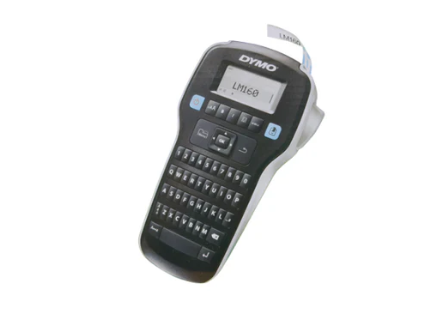
DYMO Label Manager 160
The DYMO Label Manager 160 is a handheld electronic label maker manufactured by DYMO, a brand globally recognized for labelling solutions. This model is designed for simplicity, portability, and efficiency. It uses DYMO D1 label tapes and includes one‑touch smart keys that allow users to quickly format text, add symbols, and create clean, readable labels.
From the packaging visible in the image, we can identify several important specifications:
- Model Name: DYMO Label Manager 160
- Label Type: DYMO D1 labels
- Included Tape: Black on white, 12 mm x 3 m
- Weight: Approximately 350 grams
- Dimensions: Compact handheld size (approximately 203 mm length, 118 mm width, 49 mm height)
- Included Items: Electronic label maker, starter label cassette, and quick start guide
These details already suggest that the Labl Manager 160 is designed for everyday labelling tasks without unnecessary complexity.
Design and Build Quality
One of the first things users notice about the DYMO Label Manager 160 is its ergonomic design. The device is shaped to fit comfortably in the hand, making it easy to use for extended periods without fatigue. The lightweight build (around 350 g) further enhances portability, allowing users to carry it around job sites, offices, or storage rooms with ease.
The casing is made from durable plastic, designed to withstand regular handling. While it is not industrial‑grade rugged equipment, it is sufficiently strong for daily office, retail, and light technical use. The buttons are clearly labelled and well‑spaced, reducing the chance of accidental presses.
The screen is positioned at the top, providing a clear preview of the text before printing. This preview function is especially important because it helps avoid wasted label tape and printing errors.
Keyboard and User Interface
The DYMO Label Manager 160 features a which is a significant advantage for users familiar with standard computer keyboards. This layout speeds up typing and reduces the learning curve for new users.
One‑Touch Smart Keys
One of the standout features of this label maker is the inclusion of one‑touch smart keys. These keys allow instant access to:
- Text formatting options (bold, underline, etc.)
- Font size adjustments
- Special symbols and characters
- Quick label editing
Instead of navigating through complicated menus, users can format labels quickly and intuitively.
The LCD screen displays the text exactly as it will appear on the label. This visual confirmation helps ensure accuracy and reduces material waste. Even beginners can create professional‑looking labels within minutes.
Label Types and Compatibility
The DYMO Label Manager 160 uses DYMO D1 label tapes, which are known for their durability and clarity. These labels are suitable for a wide range of surfaces, including:
- Plastic
- Metal
- Glass
- Paper
- Wood (smooth surfaces)
The starter cassette included in the box is black text on white tape, measuring 12 mm x 3 meters. However, users can purchase additional D1 tapes in various color and widths (depending on availability), allowing customization for different applications.
D1 labels are resistant to:
- Smudging
- Fading
- Moisture (to a certain extent)
This makes them ideal for both indoor and semi‑outdoor environments.
Printing Quality and Performance
The printing quality of the Label Manager 160 is crisp and easy to read. Text appears sharp, with consistent spacing and alignment. The thermal printing technology eliminates the need for ink or toner, reducing ongoing costs and maintenance.
While the device is not designed for high‑volume industrial labelling it performs exceptionally well for:
- Daily office labelling
- Equipment identification
- Cable and wire labelling
- Shelf and storage labelling
The print speed is adequate for small to medium tasks, and the cutting mechanism produces clean edges when labels are removed.
Ease of Use
One of the strongest advantages of the DYMO Label Manager 160 is its ease of use. Even users with no prior experience can start labelling almost immediately.
Setup Process
- Insert the D1 label cassette into the device.
- Power on the label maker.
- Type your text using the QWERTY keyboard.
- Preview the label on the screen.
- Press print.
The included Quick Start Guide further simplifies the process, making it beginner‑friendly.

Applications and Use Cases
The DYMO Label Manager 160 is versatile and suitable for a wide range of environments.
Office Use
In offices, this label maker is ideal for:
- File folders
- Document storage boxes
- Office equipment identification
- Desk organization
Clear labels improve workflow efficiency and reduce time wasted searching for documents.
Electrical and Technical Work
For technicians and electricians, the Label Manager 160 is useful for:
- Cable identification
- Panel labelling
- Switch and socket labelling
- Network cable organization
Proper labelling enhances safety and simplifies maintenance tasks.
Retail and Small Businesses
Retailers can use this device for:
- Price tags
- Shelf labels
- Stock identification
- Storage organization
Its compact size makes it convenient for back‑office and stockroom use.
Home Organization
At home, the Label Manager 160 can be used to label:
- Kitchen containers
- Storage boxes
- Toolboxes
- Children’s school supplies
This helps maintain long‑term organization and reduces clutter.
Advantages of the DYMO Label Manager 160
Some of the key benefits include:
- Compact and lightweight design
- Easy‑to‑use QWERTY keyboard
- One‑touch formatting keys
- Clear print preview screen
- No ink or toner required
- Reliable DYMO D1 label compatibility
These advantages make it a practical choice for everyday labelling needs.
Limitations and Considerations
While the Label Manager 160 is highly capable, it does have some limitations:
- Not designed for heavy industrial use
- Limited to DYMO D1 tapes
- No PC or mobile connectivity
- Best suited for small to medium label volumes
Understanding these limitations helps set realistic expectations.
Maintenance and Care
Maintaining the DYMO Label Manager 160 is simple:
- Keep the device clean and dry
- Store it in a dust‑free environment
- Use only compatible DYMO D1 tapes
- Avoid forcing the tape mechanism
With proper care, the device can last for years.
Environmental and Cost Considerations
Because the Label Manager 160 uses thermal printing, there is no need for ink cartridges, reducing waste and long‑term costs. Replacement label tapes are affordable and widely available, making this device economical over time.
Comparison with Other Label Makers
Compared to basic manual label makers, the DYMO Label Manager 160 offers:
- Faster operation
- Better text clarity
- Greater formatting options
Compared to advanced, PC‑connected models, it is more affordable and portable, making it ideal for users who want simplicity without sacrificing quality.
Who Should Buy the DYMO Label Manager 160?
This label maker is best suited for:
- Office administrators
- Technicians and electricians
- Small business owners
- Home organizers
- Schools and educational institutions
It is particularly valuable for users who want a reliable, standalone labelling solution.
Conclusion
The DYMO Label Manager 160 is a practical, efficient, and user‑friendly electronic label maker designed for everyday labelling tasks. Its compact design, intuitive QWERTY keyboard, and one‑touch smart keys make it accessible to both beginners and experienced users. While it may not replace industrial‑grade labelling systems, it excels in offices, homes, workshops, and small businesses.
If you are looking for a dependable labelling tool that balances simplicity, performance, and affordability, the DYMO Label Manager 160 is a strong choice. It turns organization into an easy and manageable task, helping you maintain clarity, safety, and efficiency in any environment.

About author

Add comment